


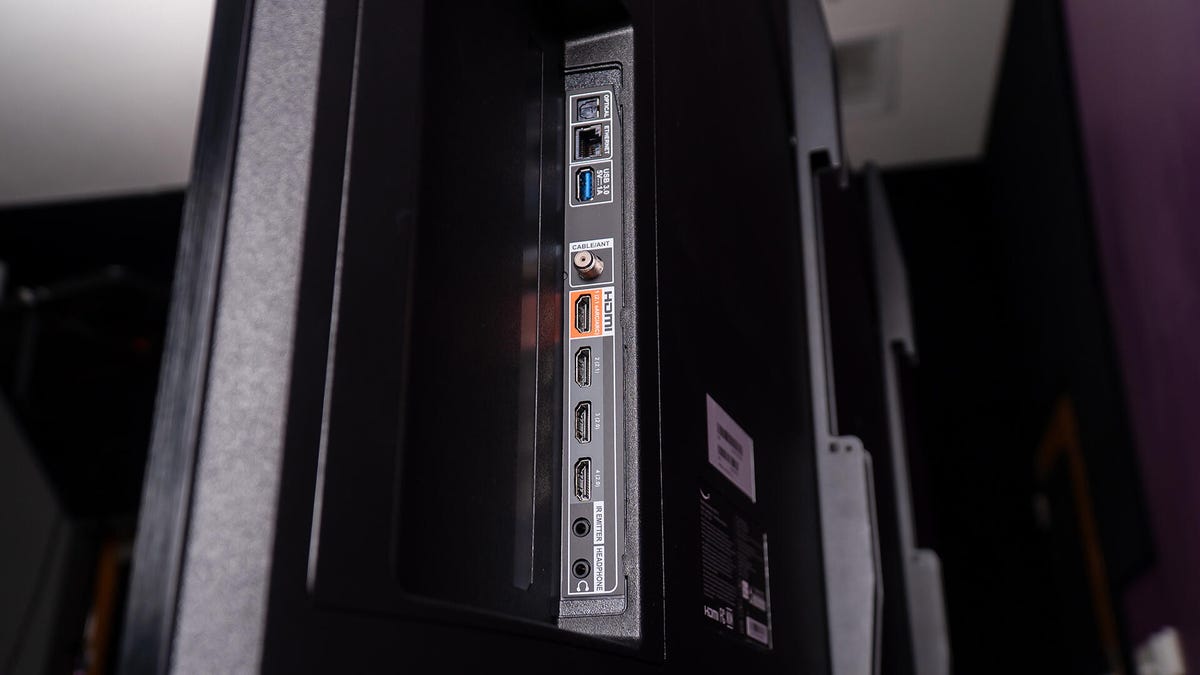
Maximizing the Potential of Your TV's USB Port
Once you've set up your smart TV, it's likely you interact with it mainly through remote apps or wireless features. Nestled by essential ports like HDMI, the USB 2.0 port often goes unnoticed on the TV's flank or back, yet it offers more possibilities than you might imagine.
While it's easy to ignore these ports, they're commonly present on TVs and surprisingly versatile. Here are five innovative uses for that overlooked port.
1. Use Slideshow or Media Playback Functions
Most TVs today provide USB 2.0 ports alongside a potentially faster USB 3.0 port. Given your TV's larger screen compared to a standard computer monitor, why not use it to display photo slideshows or video libraries?
At a recent family event, the host used a TV as a giant digital photo frame, playing pictures and videos off a USB stick. The visuals were impressive, simply by inserting a USB drive.
Almost any external storage device, when connected, acts as it does with a computer. The TV recognizes the device and allows easy access to explore your media.
2. Convert Your TV for Work Use
Handling numerous open documents or creative projects on a smaller monitor can be tricky. While pricey monitors offer better color quality, a larger TV screen can give you the space you need. Attach a Bluetooth adapter to link a wireless keyboard or mouse.
This setup on a large screen eases multitasking and complex work, provided you use USB-connected peripherals.
3. Enable Streaming on Older TVs
Older TVs might rely on external devices for streaming. Though many need power from an A/C outlet, some gadgets like earlier Fire Sticks and Chromecasts can draw power from the TV itself, eliminating the need for additional plugs.
For instance, my TCL TV has a Roku stick linked through HDMI and USB for power from the TV. Such setups work but might affect device performance due to power limitations.
4. Emergency Charging Hub
Should you find yourself without a charger, your TV's USB port can step in as a power source, albeit a slow one. Devices like controllers might charge sluggishly, but it'll work when needed.
Remember, those USB ports serve useful purposes, from accessing files to powering or charging devices in a pinch.
5. Update Your TV's Software
Keeping your TV software up-to-date is important for optimal performance. For TVs lacking built-in internet, a USB update is essential. Manufacturers often release updates improving functionalities and fixing bugs. Download the software, transfer it to a USB, and update your TV via the port.
Locate your TV model's support page, grab the latest software, and follow instructions for a successful installation.
Leave a Reply